Give every piece of work a clear next step
Turn a request into a plan people can follow, with owners, dates, dependencies and the conversation beside the work.
Get started free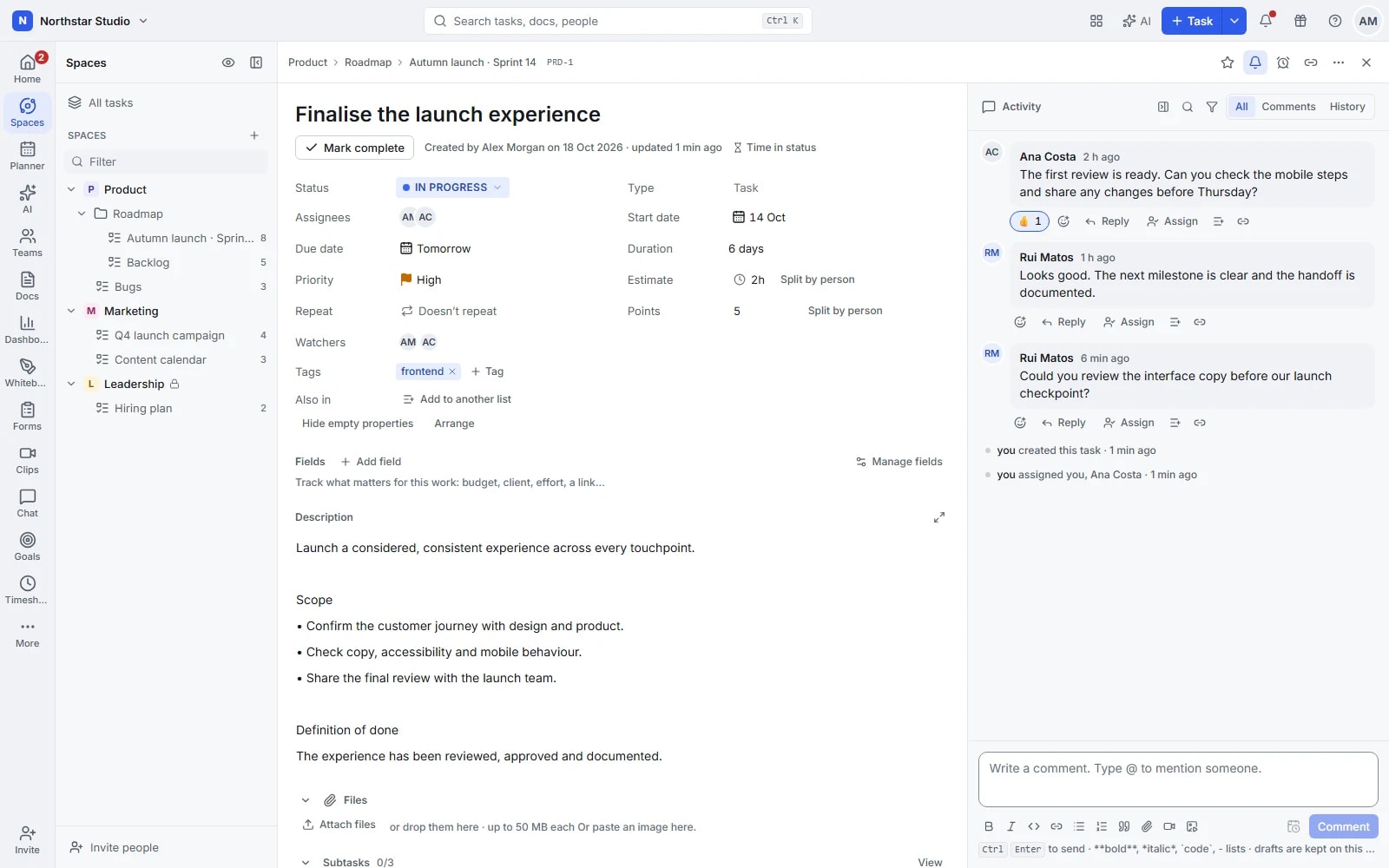
From a loose brief to work that moves
A task should tell someone what needs doing, who is doing it and what comes next. Talqivo keeps those answers together. Organise teams into spaces, projects into folders and work into lists, then add the detail each task needs without making every project follow the same structure.
The details your team can work with
- Break work into useful pieces
- Use subtasks for work that needs its own owner or date, and checklists for smaller steps. Keep the overall deliverable visible while different people handle the details.
- Show what is waiting on what
- Connect blocking and waiting tasks so handovers are explicit. Set priorities, start dates and due dates; use dependency rescheduling when a change needs to flow through the plan.
- Keep the brief with the task
- Add custom fields for the details your team tracks, attach reference files and discuss decisions in comments. The next person can pick up the work with its context intact.
- Make repeat work easier to start
- Save a proven setup as a template and schedule recurring tasks for regular responsibilities. Carry a useful structure into the next project instead of rebuilding the same checklist.
Explore the details
- Quick creation and text capture
- Create work from the quick add dialog or a written description, then confirm the destination and details before saving.
- Subtasks and checklists
- Give larger steps their own subtasks and use checklists for smaller checks, keeping the main delivery visible throughout.
- People, teams and watchers
- Assign individuals or teams, add several owners when needed and follow a task to receive its relevant updates.
- Statuses, priorities and tags
- Show where work stands with your team's statuses, distinguish urgent items and use tags to connect related tasks.
- Dates, durations and estimates
- Set start and due dates, include times where needed and record an estimate to give the plan an effort reference.
- Dependency types and date changes
- Set finish to start (FS), start to start (SS), finish to finish (FF) or start to finish (SF) dependencies; reschedule linked tasks, remap subtask dates and apply non working day rules or completion guards.
- Relationships and additional lists
- Link related tasks and show a task in additional lists while keeping one original record and its shared updates.
- Recurring work and reminders
- Set a repeating schedule for regular tasks and create reminders when a specific responsibility needs attention at another time.
- Task types, milestones and IDs
- Distinguish bugs, features and milestones with task types, and use a space's custom ID prefix to recognise its work.
- Descriptions and task discussions
- Write formatted descriptions, mention colleagues and discuss changes in comments so the explanation stays beside the work it concerns.
- Assigned feedback and file review
- Assign a comment when feedback needs an owner, resolve the discussion and annotate supported files at the relevant point.
- Files, documents and references
- Attach files, associate supporting documents and add web references so the next person can find the material needed to continue.
- Bulk changes and keyboard actions
- Select several tasks to update shared details, move work or apply other supported actions, with keyboard shortcuts for frequent steps.
- Duplicate, merge, move and review
- Reuse a task, merge overlapping work or move it to another location, then consult its activity to understand what changed.
Build a plan the team can actually use
Start with one deliverable. Add structure where it answers a practical question, then follow the work as it moves.
Capture the outcome
Create a task in the right list, explain the expected result and attach the material someone needs to get started.
Agree the handovers
Assign the work, set dates and split larger pieces into subtasks. Connect dependencies before they become a surprise.
Keep the record current
Update status as work progresses, resolve questions in comments and reuse the finished structure when the same work comes around.
One website launch, several moving parts
Create a launch task with subtasks for copy, design, implementation and review. The implementation waits for approved design; the review waits for implementation. Files and feedback stay on the relevant tasks, while the project lead can see which handover is holding up the launch.
An example you can adapt to your own team.
Questions about Tasks
When should I use a subtask rather than a checklist?
Use a subtask when a piece of work needs its own dates, status or discussion. Use a checklist for a short sequence of checks within the task; checklist items can also have assignees.
Can different teams track different details?
Yes. Organise work in separate spaces and lists, then use custom fields, statuses and templates to reflect each team's process. You can keep a shared structure without forcing identical workflows.
Make space for the work that matters.
Bring your next project into Talqivo. Start with a task, invite your team and build from there.
Get started free